Runlevels (SysVinit) and Targets (Systemd)
LINUXDEBIANUBUNTUCENTOSLPIC-1
Warning: It is recommended to practice the following commands in your lab with a VM. The author is not responsible of any damage to the system.
Key States to Know (systemd)
enabled: The unit will start automatically when its target is reached.
disabled: The unit will not start automatically, but it can be started manually or by another service.
static: The unit doesn't have an "install" section. It usually only runs if another service specifically needs it.
masked: The "Super Disabled" state. It is linked to /dev/null so it cannot be started, even manually.
Which command is equivalent to init 6? (SysVinit)
telinit 6
Where is the location where SysVinit scripts are stored?
/etc/init.d
/etc/inittab
The /etc/inittab file contains the default runlevel to set when the system boots on a SysVinit system. Specifically, the id:5:initdefault line (which shows runlevel 5 is the default runlevel). The runlevel can be set to any number between 1-5.
$ grep ^id /etc/inittab
id:5:initdefault:
# runlevel
# init 3
Systemd command using runlevels
The following command takes your system to single user mode, using a backwards compatible syntax ("runlevel1"), which is equivalent to rescue.target.
# systemctl isolate runlevel1
The old way where scripts are
Path Role Key Feature
/etc/init.d/ Script Storage Contains the actual shell scripts to start/stop services.
/etc/rc.d/ Runlevel Organization Contains the directories for each runlevel (rc0.d - rc6.d).
Is system running normally? (systemd)
$ systemctl is-system-running
degraded
maintenance(rescue.target)(emergency.target)
running
See what targets are active
$ systemctl list-units --type=target --state=active
See what targets are enabled (are loaded at startup)
$ systemctl list-unit-files --state=enabled
Where the files are
ls /etc/systemd/system (it overrides /usr/lib; admins can edit the files)
ls /run/systemd (pseudo FS)
ls /usr/lib/systemd (vendor files; do not edit!)
Managing targets
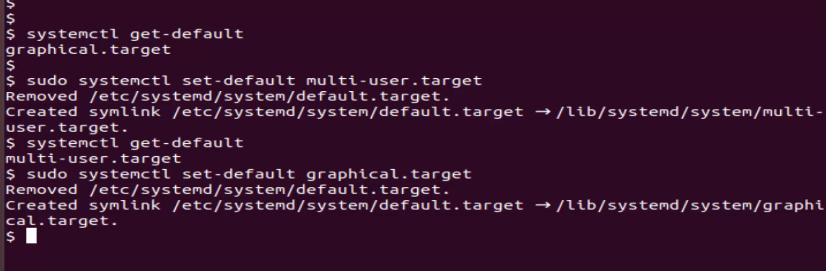
systemctl get-default (Check current boot target)
systemctl set-default <target> (Change boot target permanently)
systemctl isolate <target> (Switch target immediately without rebooting)
Comparison with runlevels and targets
Target Runlevel What it actually does
poweroff.target 0 Shuts down the system.
rescue.target 1 Single-user mode (repair mode).
multi-user.target 3 Normal server mode (Command line, no GUI).
graphical.target 5 Normal desktop mode (GUI).
reboot.target 6 Restarts the system.
Emergency and Recovery modes
To jump to Emergency mode:
systemctl isolate emergency.target
To jump to Recovery mode:
systemctl isolate rescue.target
It is recommended to try the rescue.target first, and then, if you need a minimal state you can switch to emergency.target.
If you wanted to get to emergency.target from the boot screen, you would have to manually edit the kernel line (by pressing e) on the Grub menu (the line that starts with something like "linux..") and add systemd.unit=emergency.target to the end. (This is the recommended way rather than using the "isolate" command)*
rescue.target is sometimes called "single-user mode" (the systemd equivalent of the old SysVinit runlevel 1). It mounts all local filesystems, starts some basic services, and gives you a root shell. It's a relatively "comfortable" recovery environment — you have a functional enough system to do most repair tasks like fixing fstab, resetting passwords, or repairing a broken package.
emergency.target is much more bare-bones. It boots with the absolute minimum — the root filesystem is mounted read-only, no other filesystems are mounted, and almost no services are started. It's designed for situations where even rescue.target fails to boot, like a severely broken fstab or a corrupted filesystem.
A quick comparison:
rescue.target emergency.target
Local filesystems mounted Yes (read/write) Only root (read-only)
Basic services started Yes No
Network No No
Use case General repair tasks Severe/critical failures
Equivalent to Runlevel 1 / single-user Sulogin with nothing loaded
When to use which:
Use rescue first — it's more comfortable and covers most scenarios like fixing boot issues, fstab errors, or resetting passwords.
Drop to emergency when rescue itself won't boot, or when you need to repair the root filesystem (since it's read-only, you can safely run fsck on it after remounting).
If you're in emergency.target and need to make changes, you'll need to remount root as read-write first:
mount | grep "on / "
mount -o remount,rw /
If you are in emergency.target you may need to run fsck to the / (root) FS.
First, check that / (root) is in ro, also check the root FS device (vda1, sda1, ..):
mount | grep "on / "
Then, you can run fsck:
fsck -y /dev/vda1 # Replace with the current device name
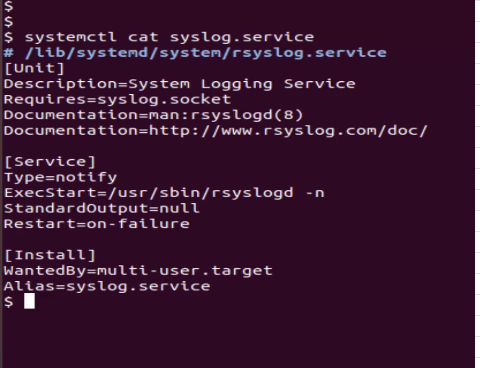
Check the contents of the script of a service
systemctl cat syslog.service
Notes:
* for more about Grub and how your system boots, go here.
Contact
hello@unixtips.eu
© 2025. All rights reserved.