Booting the system
LPIC-1LINUX
TL;DR
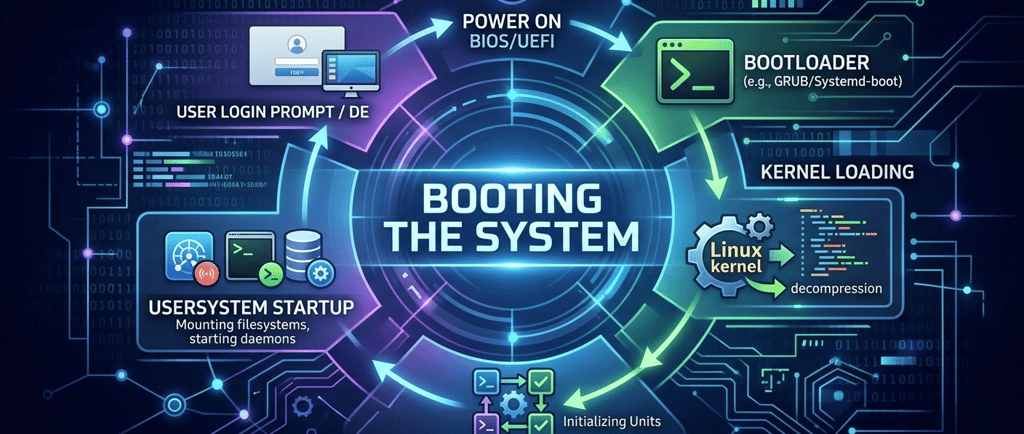
BIOS/UEFI -> Bootloader (GRUB) -> vmlinuz (compressed Linux kernel binary) + initramfs (or initrd) (temporary root FS) -> / FS mounted. System starts with PID 1 (systemd or in SysV init) -> target(systemctl get-default) or runlevel (default runlevel set in /etc/inittab)
BIOS -> MBR that points to the next stage (First 512 bytes) -> dos
UEFI -> EFI System Partition (ESP) with more space to have different bootloaders of different operating systems. -> gpt
lsblk -> /boot/efi
sudo fdisk -l | grep -i -C 6 gpt
Installing Grub
Grub legacy -> grub-install /dev/sdX or grub-install '(hd0)'
Grub2 -> grub-install (auto-detects EFI partition)
Modifying Grub legacy
Grub legacy -> edit /boot/grub/menu.lst or /boot/grub/grub.conf directly
Grub2 -> modify /etc/default/grub and then running update-grub (grub-mkconfig -o /boot/grub/grub.cfg)
Legacy syntax:
default=0 -> It means it is the first OS to boot
hiddenmenu -> press Esc to show the menu
root (hd0,0) -> it loads the first partition in the first disk, the same as sda1.
timeout=10
Ways of recovering the root password
GRUB Edit Menu (e):
Append either of the following at the end of the line that starts with "linux.."
init=/bin/bash
rd.break
SysVinit -> services start one after another -> a service is identified by a number
Systemd -> units (services, mounts, sockets, ...) start in parallel -> logs can look "scrambled"
systemd-analyze critical-chain -> time units took to load
targets -> unit containers -> loads with their defined dependencies in its configuration
targets: emergency.target, rescue.target (1), multi-user.target (3), graphical.target (5), reboot.target (6)
systemctl get-default (Check current boot target)
systemctl set-default <target> (Change boot target permanently)
systemctl isolate <target> (Switch target immediately without rebooting) (Not recommended)
Switch to a target from the boot screen (Recommended) (temporary change) -> "e":edit, look for the line that starts with "linux" and add to the end "systemd.unit=whatever.target", usually emergency.target or rescue.target.
------------------------
1 Boot sequence
POST (Power On Self Test) from the BIOS or UEFI firmware.
Then, it finds the bootloader, usually GRUB.
Once GRUB is loaded, the bootloader finds initramfs (modern)/initrd (legacy) with a temporary root, and loading a kernel image with some basic drivers on memory (vmlinuz). The initrd or initramfs file exists in /boot and is specified in your grub.cfg or menu.lst.
Once the image is loaded, the root FS is mounted. The system starts with PID 1 (systemd).
Depending on the configuration, a specific runlevel or target is started.
Legacy: The default runlevel is stored in /etc/inittab.
Modern: systemctl get-default, will show you the default target.
vmlinuz is the compressed Linux kernel binary — the actual executable file that the bootloader (GRUB) loads into memory to start the operating system.
The name breaks down as:
vm → virtual memory (the kernel manages virtual memory)
linux → it's the Linux kernel
z → it's compressed (with gzip, historically)
It lives in /boot/vmlinuz-<version>.
2 Installing GRUB Legacy
GRUB Legacy syntax for installation:
First hard drive in MBR: grub-install '(hd0)'
First hard drive, first partition: grub-install '(hd0,0)'
Other available syntax for installation:
First hard drive in MBR: grub-install /dev/sda
First hard drive, first partition: grub-install /dev/sda1
3 "Legacy" and "Modern" ways of storing boot information
Legacy (BIOS/MBR): The boot code is hidden in the first 512 bytes (MBR). It is hard to manage and easy to overwrite. It covers the stage 1 of the bootloader. Its only job is to point to the next stage.
Modern (UEFI/ESP): The boot code is stored as standard files within the ESP (EFI System Partition). This allows you to have multiple bootloaders (e.g., Windows and Linux) living side-by-side in their own folders (e.g., /EFI/ubuntu/ and /EFI/Microsoft/) without fighting for the same 512-byte space.
Quick Command: If you want to see if your system is using an ESP right now, you can run lsblk or fdisk -l. Look for a small partition (usually 100MB–500MB) that it usually appears as "/boot/efi".
4 Summary Table
Feature BIOS + MBR UEFI + GPT
GRUB Location Sector 0 (MBR) EFI System Partition (FAT32)
Storage Capacity Extremely limited (512 bytes) Large (can hold many .efi files)
Primary Command grub-install /dev/sda grub-install (auto-detects ESP)
grub-install '(hd0)'
Note: In the context of the EFI System Partition (ESP), GPT is the modern standard for organizing how a disk is carved into sections. While the old MBR (Master Boot Record) was limited and a bit fragile, GPT was designed specifically to work with UEFI firmware. If you run fdisk -l, look at the Disklabel type row:
dos = MBR (Legacy)
gpt = GPT (Modern/UEFI)
sudo fdisk -l | grep -i -C 6 gpt # looks for the EFI partition
5 More configuration examples
Location Purpose
/proc/cmdline View the parameters of the currently running kernel.
GRUB Edit Menu (e) Temporarily modify parameters before the kernel starts. Add parameters at the end of the line that starts with something like "linux..".
/etc/default/grub (Grub2) Permanently change parameters (requires running update-grub* for Grub2).
or /boot/grub/menu.lst (Legacy)
init=/bin/bash
If you see the following line in /proc/cmdline: BOOT_IMAGE=/vmlinuz root=/dev/sda1 ... init=/bin/bash
Why would an administrator have added init=/bin/bash?
To bypass the normal init process and gain a root shell for recovery. You will gain root access bypassing the password. This is good for recovery the root password. It means that if you have physical access to a server, you get full control.
You get a root shell but is ro. To make it rw you need to remount it.
mount | grep root # or mount | grep -w ro
mount -o remount,rw /
mount | grep root # or mount | grep -w rw
Once you have changed the root password, you can't reboot or shutdown your machine with the usual commands, since systemd is not even loaded. To restart the system, try:
exec /sbin/reboot -f
But before restarting the system, you need to do something related to SELinux (RHEL/CentOS) or you may be locked out of the system. You need to tell SELinux to relabel all the system because you just changed the /etc/shadow file outside the SELinux context.
To tell the system to relabel all on the next boot:
touch /.autorelabel
rd.break
This is another way to recover the root password. In the same way, you add "rd.break" at the end of the kernel line, after editing the Grub menu with the letter "e".
This will take you to an initramfs shell. From here, you need to do:
mount | grep root # root will be in ro mode
mount -o remount,rw /sysroot
chroot /sysroot # make /sysroot your new root
passwd
touch /.autorelabel
exit # to exit chroot
exit # to exit the initramfs shell and continue to normal booting, it will relabel all the system when booting
As you exit twice and continue to normal booting, it makes rd.break a cleaner way than init=/bin/bash, that requires a command to force rebooting.
6 Modify Grub
To make any changes to the Grub menu:
Legacy: /boot/grub/menu.lst (or /boot/grub/grub.conf) is the single file needed for Grub. You edit the same file that Grub will read. There are not two separated files. You don't need to run any command at the end like update-grub.
Grub2: edit the /etc/default/grub. This will modify the /boot/grub/grub.cfg which is the file that Grub reads. Never modify directly the /boot/grub/grub.cfg file. After modifying the file, run update-grub to apply the changes.
7 Syntax
Some examples for the Legacy syntax:
default=0 -> It means it is the first OS to boot
hiddenmenu -> press Esc to show the menu
root (hd0,0) -> it loads the first partition in the first disk, the same as sda1.
Syntax comparison side by side:
Concept GRUB Legacy GRUB 2
Default entry default=0 GRUB_DEFAULT=0
Timeout timeout=10 GRUB_TIMEOUT=10
Hide menu hiddenmenu GRUB_TIMEOUT_STYLE=hidden
Kernel params on the kernel line GRUB_CMDLINE_LINUX=
8 Targets vs. runlevels
SysVinit -> services start one after another -> a service is identified by a number
Systemd -> units (services, mounts, sockets, ...) start in parallel -> logs can look "scrambled"
systemd-analyze critical-chain -> time units took to load
targets -> unit containers -> loads with their defined dependencies in its configuration
targets: emergency.target, rescue.target (1), multi-user.target (3), graphical.target (5), reboot.target (6)
systemctl get-default (Check current boot target)
systemctl set-default <target> (Change boot target permanently)
systemctl isolate <target> (Switch target immediately without rebooting) (Not recommended)
Switch to a target from the boot screen (Recommended) (temporary change) -> "e":edit, look for the line that starts with "linux" and add to the end "systemd.unit=whatever.target", usually emergency.target or rescue.target.
Notes:
* When running update-grub, you are actually running grub-mkconfig -o /boot/grub/grub.cfg behind the scenes.
Contact
hello@unixtips.eu
© 2025. All rights reserved.