Managing shared libraries (Part 2)
LINUXLPIC-1


Developing a new library
We can use the ldconfig command to view or rebuild a library cache.
A library cache is a list of the various library directories as well as all the libraries contained within these directories. It is used for quickly loading programs. The library cache builder is run automatically by package managers when you install packages.
You can use the ldconfig command to build the cache yourself or view the cache, but we need some additional options on the command.
$ ldconfig -vN
(This will allow us to view the cache.)
Let's pretend that we're developing programs and app libraries so I can show you how to properly modify this environment variable, that's currently not set.
$ echo $LD_LIBRARY_PATH
I want to make sure that this variable is available to sub shells.
$ export LD_LIBRARY_PATH=$LD_LIBRARY_PATH:/home/appProject
The ldconfig command will let you update the current library cache, after you update the library path environment variable.
Troubleshooting a library issue
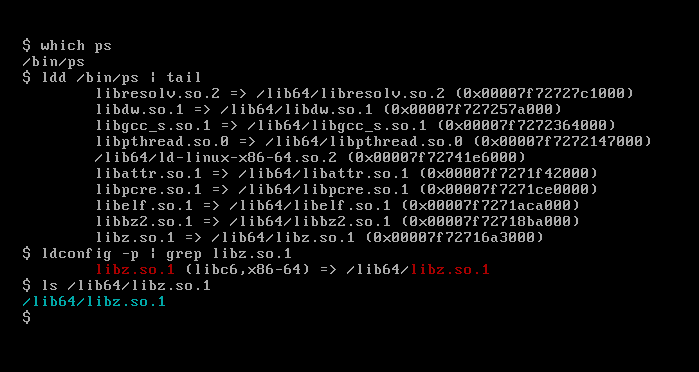
Let's pretend that I just installed a program called ps and it's not working properly.
First, let's get the absolute directory reference of the problematic program.
$ which ps
Then we can use the ldd command to see all the libraries.
$ ldd /bin/ps
We can search a library in the cache and also see where it is:
$ ldconfig -p | grep libz.so.1
The next step is to determine if the library files are in their directory with the ls command. If they are not, you may have to reinstall the application.
This page is the continuation of this page.
Contact
hello@unixtips.eu
© 2025. All rights reserved.