Symbolic link and hard link
LPIC-1LINUX
TL;DR
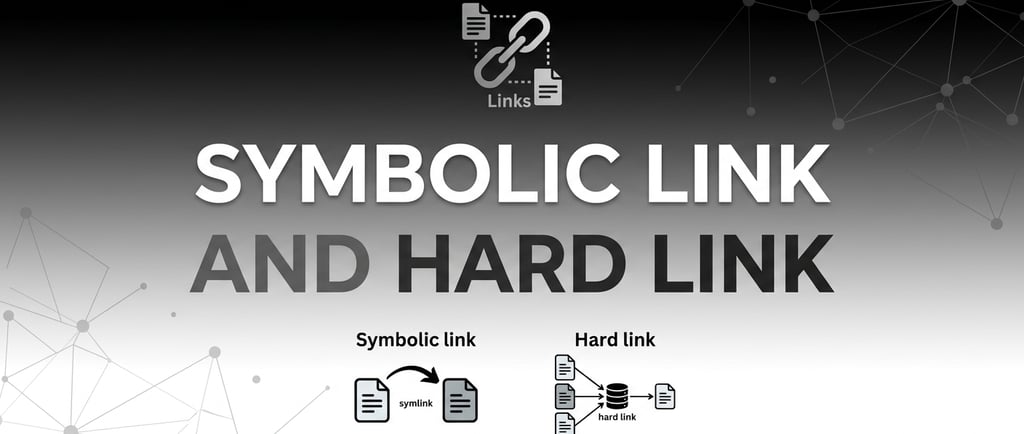
ln -s -> symlink -> different inode -> portable
ln -> hard link -> same inode -> not portable
ls -i -> listing inodes (for files); ls -id -> listing inodes (for directories)
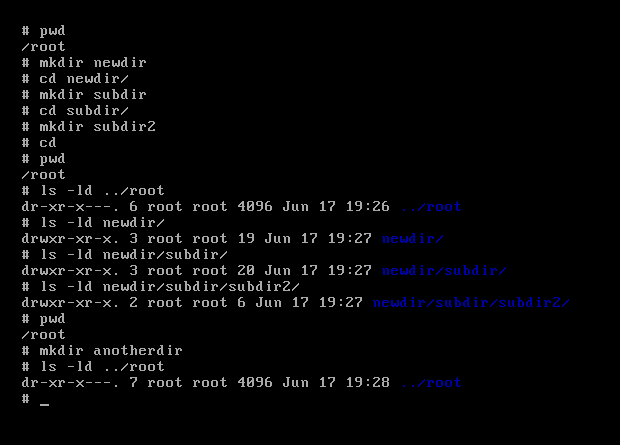
Hard link count number is right after the permissions with "ls -l", for files, or "ls -ld" for directories. The default for files is 1. The default for directories is always 2. When you create a subfolder the count for the parent directory returns 3 when an immediately subdirectory is created. If you create another direct subdirectory, it will also increase to 4. However, if you create another directory inside the direct directory, it won't affect the hard link count because it is not the immediate parent directory. You cannot manually create a hard link for a directory. This is the hard link count, so creating a symbolic link doesn't change the hard link count.
----------------------------------------------
1 Create a link
So this is how you create a symbolic link:
ln -s real_file_or_dir linked_file_or_dir
and to create a hard link:
ln original_file_or_dir linked_file_or_directory
2 Symbolic link vs. hard link
Symbolic links have a different inode, whereas for hard links they share the same inode.
Symbolic links are system-portable, but hard links aren't.
You can delete any of the hard links or the original file. If you keep one of the linked files, the data remains intact. However, if you delete the real file (not the linked one) in a symbolic link, you get a broken link and you lose the data.
To check the inode and properties of a file or directory:
ls -il real_file_or_directory linked_file_or_directory
ls -id original_file_or_directory linked_file_or_directory
3 The danger of recursive deletion (rm -rf)
If you run rm -rf linked_directory/ in a symbolic link, you are deleting the contents of the original directory. If you want to delete just the linked_directory, remove the trailing slash /.(When using the tab to autocomplete the words, the trailing slash might appear, so you have to delete it).
you aren't just deleting the "shortcut." Because of that trailing slash /, some shells and versions of rm interpret that as "go inside the folder and delete everything."
4 The permission "trap"
Permissions on a symbolic link are always lrwxrwxrwx, it looks like there is full access for everyone. However, these permissions are ignored.
When you try to access a file through a symlink, Linux looks at the permissions of the target (the original file/directory), not the link itself.
You can try changing permissions to a file/directory with more restricted permissions and try to access through the symlink. If you get a permission denied trying to access the original file, you will also get a permission denied when trying to access the same file through the symlink.
5 Ownership Changes (chown)
If you try to change the owner of a symlink, you will accidentally change the owner of the original file instead.
If you run:
chown user:group linked_file_or_directory
6 Where I am
It can be difficult to know if you accessed through a symlink or if you are under the real directory because the files inside look exactly the same. To know if you are under a symlink, try running and comparing both outputs:
pwd
pwd -P
If the output is different, it means that you may be accessing the files through a symlink.
7 How is that subdirectories count and hard link count are the same for directories if hard links are not allowed to directories?
Hard links to directories are not allowed, meaning you cannot create them with ln. But the . and .. entries are hard links — they are just created automatically by the kernel when a directory is created or a subdirectory is added.
So the rule is more precisely:
Users cannot manually create hard links to directories, but the kernel creates them internally via . and ..
That's why the count still reflects hard links — because . and .. genuinely are hard links to directory inodes. The restriction is only on manual creation via ln, to prevent the filesystem loops mentioned earlier. The kernel can manage the internal ones safely because it knows exactly where they are.
So the two statements are fully compatible:
"Hard link count for directories counts . and .. style hard links"
"You cannot create hard links to directories with ln"
They're just talking about different actors — the kernel vs the user.
So Hard links to directories are not allowed. Only soft (symbolic) links to directories are permitted.
The reason (good to understand, not just memorize): allowing hard links to directories could create filesystem loops — cycles in the directory tree that tools like find or fsck couldn't safely traverse.
Hard link count number is right after the permissions with "ls -l", for files, or "ls -ld" for directories. The default for files is 1. The default for directories is always 2. When you create a subfolder the count returns 3.
Some examples:
Contact
hello@unixtips.eu
© 2025. All rights reserved.