Containers
LINUXLPIC-1

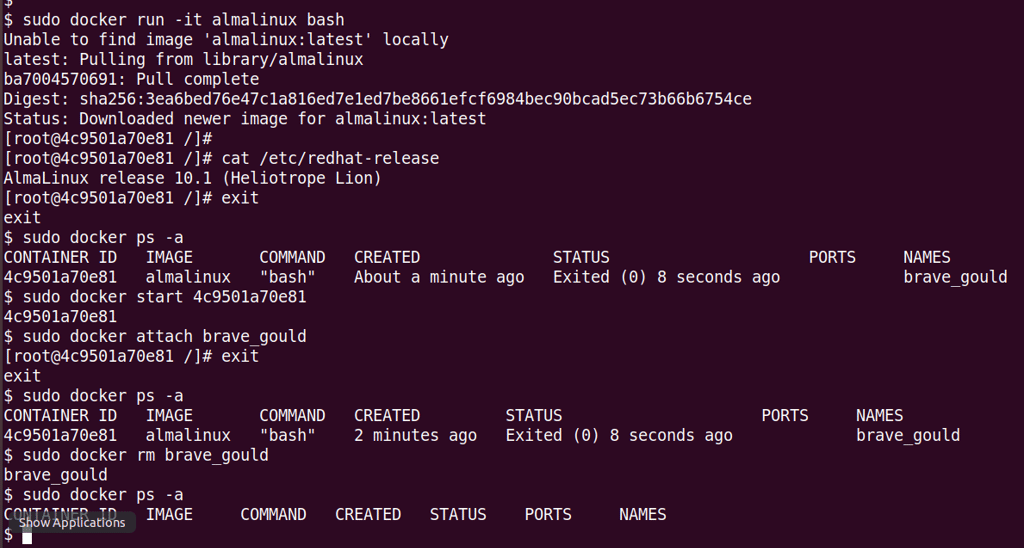
Basic Docker commands
$ sudo docker ps -a
$ sudo docker run -it almalinux bash
# cat /etc/redhat-release (Inside the container)
# exit (exiting the container and going back to our prompt)
$ sudo docker ps -a
$ sudo docker start [container_ID or Name]
$ sudo docker attach [container_ID or Name]
# exit
$ sudo docker rm [container_ID or Name]
$ sudo docker ps -a
Note 1: I'm using Alma Linux since the CentOS container seems to not be available any longer.
Note 2: An example of an orchestration application for containers is Kubernetes.
Here is a screenshot of the commands above.
The Core Kernel Technologies of Containers
You cannot have containers without these two features.
Namespaces: These provide isolation. They wrap a global system resource in an abstraction that makes it appear to the processes within the namespace that they have their own isolated instance of the resource.
Examples: pid (own process tree), net (own network stack), mnt (own file system mounts).
Control Groups (cgroups): These provide resource management. They limit, account for, and isolate the resource usage (CPU, memory, disk I/O, network) of a collection of processes.
Linux Containers (LXC) vs. Application Containers (Docker)
The exam distinguishes between these two "flavors" of containerization:
FeatureLinux Containers (LXC/LXD) Application Containers(Docker/Podman)
Philosophy "System Containers" "Process Containers"
Analogy Like a lightweight Virtual Machine. Like a single wrapped application.
Contents Runs a full init system (systemd), Ideally runs only one main process
ssh, logging, etc. (e.g., just the web server).
Persistence Usually treated as long-lived systems. Ephemeral; meant to be destroyed and replaced.
Essential Terms & Tools
Images: Read-only templates used to create containers.
Container: A runnable instance of an image.
Docker: The most common tool for managing application containers.
LXC/LXD: The tools used for system-level containers.
Containers vs. Virtual Machines (VMs)
VMs: Include a full Guest OS and a kernel. They run on a Hypervisor.
Containers: Share the Host OS Kernel. This makes them much smaller, faster to start, and less resource-heavy.
Note: Podman, a "daemonless" alternative to Docker is increasingly common in exams because it doesn't require a root daemon. Podman was created by Red Hat.
Docker vs. Podman
This is where Podman shines and differs from Docker. This describes how the tool interacts with the Host OS.
Docker (Daemon-based): Has a "Middleman" (the dockerd daemon) running as root. When you type docker run, you are asking that root-level daemon to start the container for you.
Podman (Daemonless): There is no "Middleman." When you run podman run, the container process is a direct child process of your shell.
Contact
hello@unixtips.eu
© 2025. All rights reserved.